
Quick Arxiv Vanity Links in Your Browser
Overview
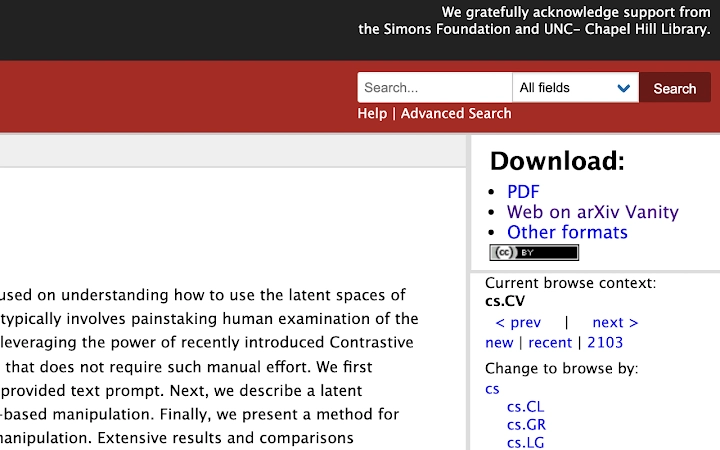
The Arxiv Vanity plugin extension is designed to streamline access to enhanced versions of academic papers hosted on arXiv.org. By integrating directly into the browser’s "Downloads" section, it enables users to generate and access arXiv Vanity links with a single click. This functionality is particularly useful for researchers, students, and academics who frequently consult arXiv papers and prefer reading them in a more readable, typeset format. The plugin operates seamlessly within the web environment, requiring no additional software installation beyond the browser extension.
It supports both the online PDF and abstract views of arXiv papers, allowing users to retrieve the corresponding vanity link regardless of the current viewing mode. The extension enhances the standard arXiv experience by bridging the gap between raw source files and polished, web-friendly renderings. Its primary purpose is to reduce friction in accessing improved layouts of scholarly content, thereby improving reading efficiency and comprehension.
Developed by isaykatsman, the plugin builds upon the original work of Andreas Jansson and Ben Firshman, who created the foundational Arxiv Vanity service. While the developer’s background is not detailed beyond the GitHub repository, the project’s open-source nature suggests community-driven development and transparency. The tool is especially suited for users engaged in technical, scientific, or mathematical research who value clarity and presentation in academic reading.
Key Features & Capabilities
- Direct Vanity Link Access – Instantly generates and displays an arXiv Vanity link within the browser’s Downloads section when viewing an arXiv paper.
- One-Click Activation – Clicking the extension icon attempts to open the associated vanity link, even if the user is currently viewing the abstract or PDF version.
- Multi-Platform Support – Functions across Windows, Mac, and Linux operating systems, ensuring broad accessibility for researchers regardless of their preferred desktop environment.
- Seamless Browser Integration – Operates directly within the Chrome browser without requiring external applications or configuration.
- Open-Source Foundation – Built on the original Arxiv Vanity project, ensuring reliability and transparency through public code access.
These features are particularly beneficial during literature reviews or when preparing for academic presentations. For instance, a researcher reviewing a paper on quantum computing can quickly access a cleaner, typeset version of the same document without navigating away from arXiv. Similarly, a graduate student compiling references can efficiently collect and share enhanced versions of key papers.
User Interface, Workflow & Performance
The user interface of the Arxiv Vanity plugin is minimal and focused on functionality. It appears as a small icon in the browser toolbar, consistent with standard Chrome extension design. Interaction is straightforward: clicking the icon triggers the retrieval and opening of the vanity link associated with the current arXiv page.
Navigating through arXiv pages remains unaffected by the extension’s presence. The workflow is efficient, requiring only one action to access the enhanced version of a paper. The extension does not modify the original arXiv interface, preserving the user’s familiar experience while adding value through enhanced accessibility.
Performance observations are based on general software behavior patterns. The extension operates in the background with minimal visible impact on page load times or browser responsiveness. The developer did not specify resource usage details, but given its lightweight design and single-purpose functionality, it is expected to consume minimal CPU and RAM. Stability is assumed to be high due to its simple architecture and reliance on existing web standards.
Compatibility & System Requirements
The Arxiv Vanity plugin is compatible with Windows, Mac, and Linux operating systems. It is designed to run within the Chrome browser, leveraging its extension ecosystem for deployment and updates.
The installation size is 1.2 MB, indicating a lightweight footprint. This small size suggests minimal impact on disk space and quick installation times. The software version is 1.0.0, indicating a stable release with a clear initial public availability.
Exact system requirements were not listed. However, since the extension relies on Chrome’s runtime environment, users should ensure their system meets the baseline requirements for running the latest version of Chrome. Compatibility with older Chrome versions is not specified, but the extension is likely to function on current and recent releases.
Pros and Cons
Pros
- Effortlessly generates arXiv Vanity links directly from the browser
- Works seamlessly across Windows, Mac, and Linux
- Lightweight and fast, with minimal resource consumption
- Open-source and transparent, built on a trusted foundation
- One-click access to enhanced paper formats improves research workflow
Cons
- Limited to Chrome browser; no support for other browsers
- Requires manual activation via the extension icon
- Functionality depends on the availability of vanity links for each paper
- No built-in offline mode or caching mechanism
- Developer documentation and user guides are not provided
FAQ Section
Is the Arxiv Vanity plugin available for browsers other than Chrome?
The extension is currently designed for Chrome. There is no official support for other browsers such as Firefox, Edge, or Safari.
Is the plugin secure to use?
As an open-source extension hosted on GitHub, the code is publicly available for review. Users are advised to install it only from official sources to ensure authenticity and security.
How often are updates released?
Update frequency is not specified. However, the project is maintained on GitHub, where users can track changes and report issues.
Does the plugin require an internet connection?
Yes, the plugin requires an active internet connection to retrieve and open vanity links from the arXiv Vanity service.
Can I use this tool offline?
Offline usage is not supported. The plugin depends on real-time access to external services to generate and open vanity links.
Final Thoughts
The Arxiv Vanity plugin extension delivers a focused, efficient solution for researchers who rely on arXiv for academic content. Its ability to quickly generate and access enhanced paper formats directly from the browser significantly improves workflow efficiency. While limited to Chrome and requiring an internet connection, its lightweight design, cross-platform compatibility, and open-source foundation make it a trustworthy addition to any academic toolkit.
For researchers, students, and professionals in STEM fields, this tool eliminates friction in accessing clearer, more readable versions of scholarly papers. It enhances the standard arXiv experience without complexity or overhead.
Download Arxiv Vanity now







